Intended Audience: Learners
What is a Coupon?
A coupon is a code your organization gives you that lowers the price of a course, learning path, or registration — either by a dollar amount or a percentage. Coupons are sometimes limited to specific courses or sections, so a code that works for one offering may not work for another.
Before you start
- Have your coupon code ready (copy/paste it if you can, to avoid typos).
- Know what the code is for. Some coupons only apply to a specific course, section, or learning path — if you got the code for one course, it may not apply to others in your cart.
- Coupons can also be capped at a limited number of total uses. If a code has already reached its limit, it will no longer work, even if it's not expired.
How to Redeem Your Coupon
- Find your course. Log in to your Learner Dashboard and browse the Course Catalog to locate the course, section, or learning path you want.
- Add it to your cart. Click View Offerings on the course tile, then add the offering to your Shopping Cart.
- Go to checkout. Click the Cart icon to review your selections, then click Checkout.
- Enter your coupon code. On the checkout page, look for a Coupon Code (or Promo Code) field. Enter your code exactly as it was given to you (coupon codes are often case-sensitive) and click Apply.
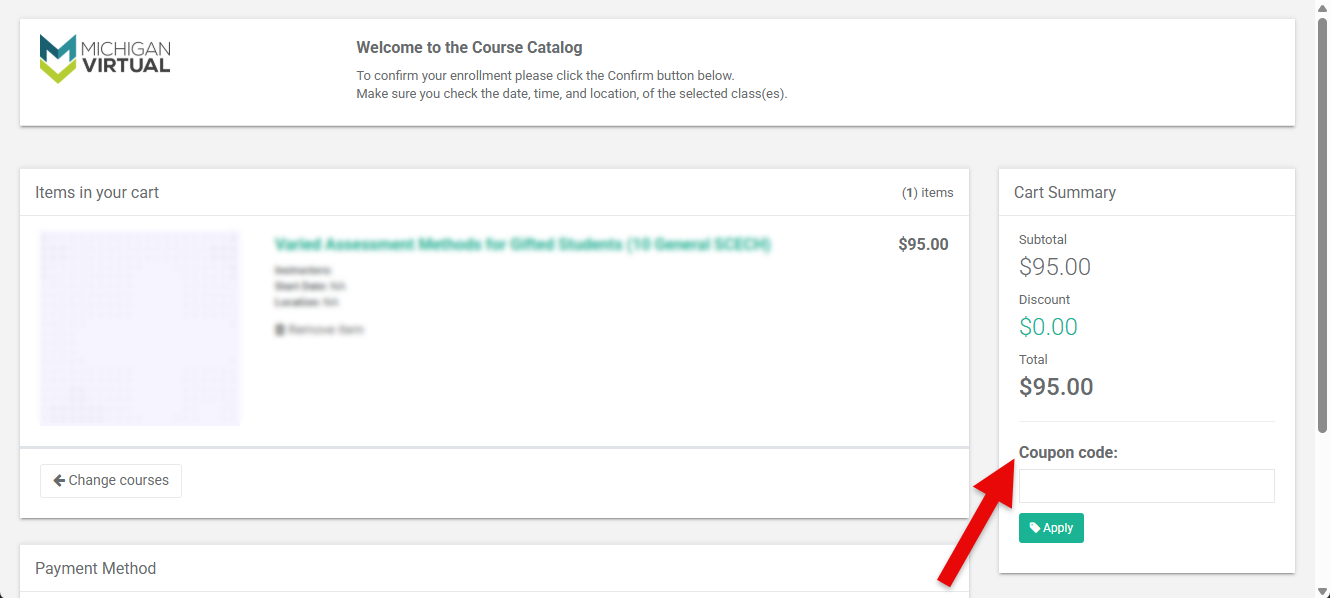
Check your total. Your order total should update to reflect the discount. If it doesn't change, see the troubleshooting tips below.
- Complete your payment. Choose your payment method (credit card, check, or interdepartmental chargeback, if available to you) and finish checkout. Depending on your organization's setup, you may be enrolled automatically once payment is processed.
Coupon Code Not Working?
- Double-check the code. Coupon codes are typically case-sensitive — re-copy or retype it carefully.
- Confirm it applies to what's in your cart. Coupons can be restricted to a specific section, learning path, or affiliation. If your cart contains something the coupon wasn't set up for, it won't apply.
- It may be maxed out. Coupons can have a usage cap. Once that cap is reached, the code stops working for everyone, even before an expiration date.
- It may be expired or no longer active. Ask your administrator to confirm the code is still valid.
- Still stuck? Contact Customer Care with the exact code you're trying to use and the course/section you're registering for.
Additional Information
- Only one coupon can typically be applied per order whether codes can be combined.
- Discounts apply only to the course, section, or learning path the coupon was created for.